
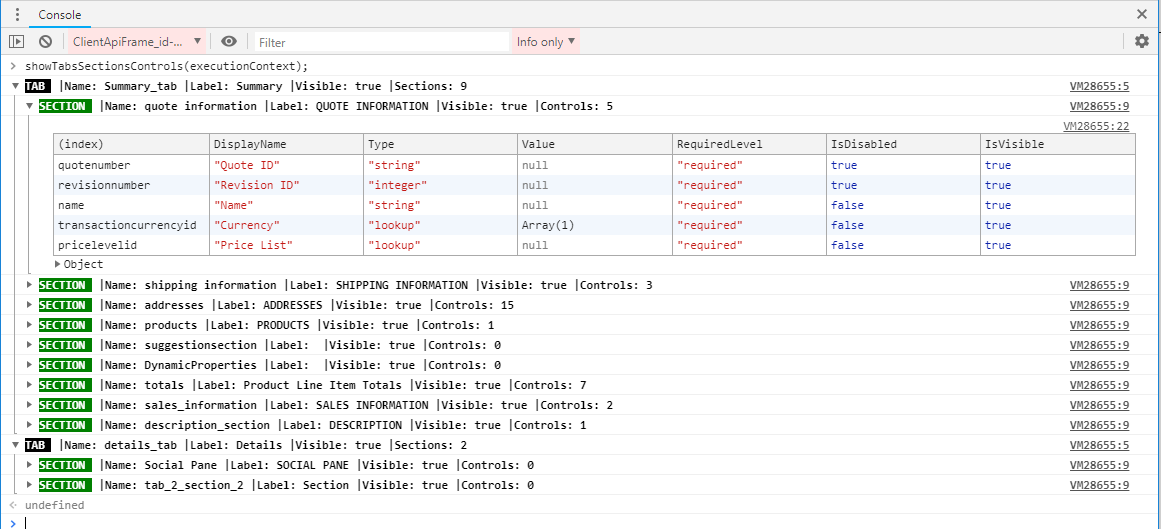
The below function shows all components in a Microsoft Dynamics 365 form:
function showTabsSectionsControls(executionContext){
    var formContext = executionContext.getFormContext();
    formContext.ui.tabs.forEach(
        function(tabObj,index){
            console.groupCollapsed('%cTAB %c '+`|Name: ${tabObj.getName()} |Label: ${tabObj.getLabel()} |Visible: ${tabObj.getVisible()} |Sections: ${tabObj.sections.getLength()}`,'background:black;color:white','background:transparent;color:black;font-weight:bold;');
            tabObj.sections.forEach(
                function(sectionObj,index){
                    var controls ={};
                    console.groupCollapsed('%cSECTION %c '+`|Name: ${sectionObj.getName()} |Label: ${sectionObj.getLabel()} |Visible: ${sectionObj.getVisible()} |Controls: ${sectionObj.controls.getLength()}`,'background:green;color:white','background:transparent;color:black;font-weight:bold;',);
                    sectionObj.controls.forEach(
                        function(controlObj,index){
                            controls[controlObj.getName()] ={
                                'DisplayName':controlObj.getLabel(),
                                'Type': controlObj.getAttribute != null? controlObj.getAttribute().getAttributeType():controlObj.getControlType(),
                                'Value': controlObj.getAttribute != null? controlObj.getAttribute().getValue(): '',
                                'RequiredLevel': controlObj.getAttribute != null? controlObj.getAttribute().getRequiredLevel():'',
                                'IsDisabled' : controlObj.getDisabled != null ? controlObj.getDisabled():'',
                                'IsVisible' : controlObj.getVisible(),
                            }
                        }
                    );
                    console.table(controls);
                    console.groupEnd();
                }
            );
            console.groupEnd();
        }
    );
}
Open the browser console in order to see the result.
New Comment